
Difference between revisions of "Making an Instrument Track with Pro Tools"
From Help Wiki
(Created page with "== Overview == This article describes making, playing, and recording an instrument track in '''Pro Tools'''. * The '''Multimedia Lab (MML)''' has MIDI keyboards available, as...") (Tag: VisualEditor) |
(No difference)
|
Revision as of 10:20, 3 July 2024
Overview
This article describes making, playing, and recording an instrument track in Pro Tools.
- The Multimedia Lab (MML) has MIDI keyboards available, ask a lab aide.
- All other Audio Labs including the Mixing Benches have some kind of MIDI keyboard.
Creating an Instrument Track
- Open a new Pro Tools project. It is recommended to use the default template, which varies depending on the lab.
- The template does not have any instrument tracks load by default, so we need to create one.
- Under the Track drop down, select New.

- The New Tracks submenu will appear; use the drop downs to create a new mono Instrument track.
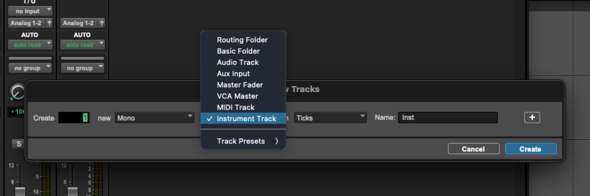
- Under the Track drop down, select New.


