
File:Ableton midi tracks.png
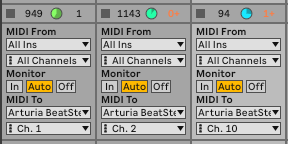
A screenshot of three side-by-side MIDI track settings from Ableton Live, showing the routing configuration needed to send MIDI from the DAW to the BeatStep Pro. Each track displays an identical set of controls:
MIDI From: All three tracks set to "All Ins" and "All Channels" Monitor: "Auto" is selected (highlighted) on all three tracks, with "In" and "Off" as the unselected options MIDI To: All three tracks route to "Arturia BeatStepPro" Channel: The only differing setting — Track 1 is set to "Ch. 1", Track 2 to "Ch. 2", and Track 3 to "Ch. 10"
This screenshot illustrates the channel-assignment pattern that drives Sequence 1, Sequence 2, and the drum gates on the BeatStep Pro respectively.
File history
Click on a date/time to view the file as it appeared at that time.
| Date/Time | Thumbnail | Dimensions | User | Comment | |
|---|---|---|---|---|---|
| current | 13:43, 16 April 2026 | | 288 × 144 (11 KB) | Kamenb (Talk | contribs) | A screenshot of three side-by-side MIDI track settings from Ableton Live, showing the routing configuration needed to send MIDI from the DAW to the BeatStep Pro. Each track displays an identical set of controls: MIDI From: All three tracks set to "All... |
- You cannot overwrite this file.
File usage
The following page links to this file:


