
Difference between revisions of "Template:AVclassroom template rack"
From Help Wiki
(→Sem 1 - Classroom AV rack.) |
|||
| (One intermediate revision by the same user not shown) | |||
| Line 1: | Line 1: | ||
| − | The Sem 1 - Classroom AV racks hold the core of each classroom's AV system in a wall mounted enclosure. The Mac Mini is mounted here, and there are 2 USB-C ports on the front ( | + | The Sem 1 - Classroom AV racks hold the core of each classroom's AV system in a wall mounted enclosure. The Mac Mini is mounted here, and there are 2 USB-C ports on the front (a USB-A hub converts one for additional ports). |
| Line 7: | Line 7: | ||
=== In the rack bays are the following: === | === In the rack bays are the following: === | ||
* Wireless mac Keyboard and Mouse (on top of the rack) | * Wireless mac Keyboard and Mouse (on top of the rack) | ||
| − | *1. DCI nameplate | + | *1. Rack HDMI panel --or-- DCI nameplate (shown) |
*2. --covered with a security mesh-- CatchBox Receiver (for both wireless mics); Solstice Wireless AV device | *2. --covered with a security mesh-- CatchBox Receiver (for both wireless mics); Solstice Wireless AV device | ||
*3-4. Extron Crosspoint video switcher with AV control processor | *3-4. Extron Crosspoint video switcher with AV control processor | ||
| Line 14: | Line 14: | ||
*7-8. --covered with a security mesh-- AV system networking | *7-8. --covered with a security mesh-- AV system networking | ||
*9. Extron MediaPort meeting bridge; encoder for display signal; Power supplies | *9. Extron MediaPort meeting bridge; encoder for display signal; Power supplies | ||
| − | *10-11. Mac Mini ; | + | *10-11. Mac Mini ; If the top bay is NOT the Rack HDMI port, Rack HDMI is to the right of the Mac Mini |
*12. --covered with a security mesh-- power conditioner for rack | *12. --covered with a security mesh-- power conditioner for rack | ||
Latest revision as of 08:52, 17 July 2026
The Sem 1 - Classroom AV racks hold the core of each classroom's AV system in a wall mounted enclosure. The Mac Mini is mounted here, and there are 2 USB-C ports on the front (a USB-A hub converts one for additional ports).
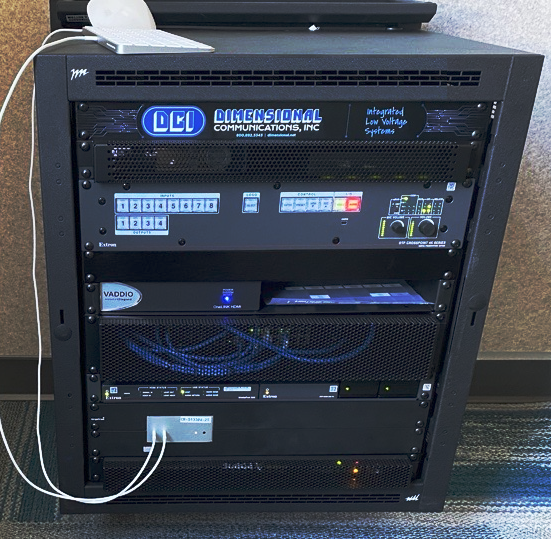

This image shows a Sem1 AV rack.
In the rack bays are the following:
- Wireless mac Keyboard and Mouse (on top of the rack)
- 1. Rack HDMI panel --or-- DCI nameplate (shown)
- 2. --covered with a security mesh-- CatchBox Receiver (for both wireless mics); Solstice Wireless AV device
- 3-4. Extron Crosspoint video switcher with AV control processor
- 5. blank plate
- 6. PTZ camera integration converter box(es)
- 7-8. --covered with a security mesh-- AV system networking
- 9. Extron MediaPort meeting bridge; encoder for display signal; Power supplies
- 10-11. Mac Mini ; If the top bay is NOT the Rack HDMI port, Rack HDMI is to the right of the Mac Mini
- 12. --covered with a security mesh-- power conditioner for rack

