
Difference between revisions of "Template:AVclassroom template rack"
From Help Wiki
m (→This image shows a Sem1 AV rack. in the rack bays are the following:) |
m (→Sem 1 - Classroom AV rack.) |
||
| Line 5: | Line 5: | ||
| − | + | [[file:AVSem1_Rack-mesh_20260330.png]] | |
=== This image shows a Sem1 AV rack. In the rack bays are the following: === | === This image shows a Sem1 AV rack. In the rack bays are the following: === | ||
* Wireless mac Keyboard and Mouse (on top of the rack) | * Wireless mac Keyboard and Mouse (on top of the rack) | ||
Revision as of 10:22, 1 April 2026
Sem 1 - Classroom AV rack.
The rack in Sem1 AV rooms holds the core of the AV system in a wall mounted enclosure. The Mac Mini is mounted here, and there are 2 USB-C ports on the front (we should be soon adding a USB-A hub on one of these) for connecting peripherals you may want to use.
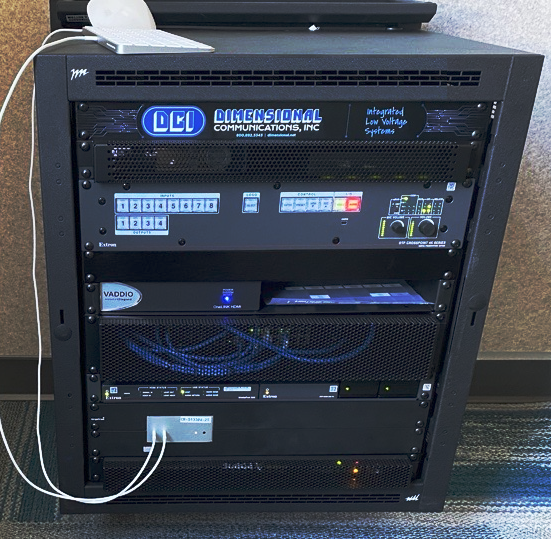

This image shows a Sem1 AV rack. In the rack bays are the following:
- Wireless mac Keyboard and Mouse (on top of the rack)
- 1. DCI nameplate
- 2. --covered with a security mesh-- CatchBox Receiver (for both wireless mics); Solstice Wireless AV device
- 3-4. Extron Crosspoint video switcher with AV control processor
- 5. blank plate
- 6. PTZ camera integration converter box(es)
- 7-8. --covered with a security mesh-- AV system networking
- 9. Extron MediaPort meeting bridge; encoder for display signal; Power supplies
- 10-11. Mac Mini ; in rooms that have an auxilliary HDMI, it is to the right of the Mac Mini
- 12. --covered with a security mesh-- power conditioner for rack

