
Difference between revisions of "Providing Feedback on a Contract"
From Help Wiki
m (subst applied to Template:TwoColumn) |
|||
| (One intermediate revision by one other user not shown) | |||
| Line 1: | Line 1: | ||
| − | |||
| + | <div class="container-fluid"> | ||
| + | <div class="row"> | ||
| + | <div class="col-md-8"> | ||
| + | <div class="lead"> | ||
As a faculty sponsor you can leave feedback on a draft contract anytime after a student enters the "collecting feedback" stage of their contract. You will receive a notification in your my.evergreen.edu "To Do List" that there is a new contract awaiting feedback. | As a faculty sponsor you can leave feedback on a draft contract anytime after a student enters the "collecting feedback" stage of their contract. You will receive a notification in your my.evergreen.edu "To Do List" that there is a new contract awaiting feedback. | ||
| − | + | </div> | |
| − | + | ||
===Leaving feedback=== | ===Leaving feedback=== | ||
| Line 23: | Line 25: | ||
*Previous comments are available for review by both the student and the sponsoring faculty | *Previous comments are available for review by both the student and the sponsoring faculty | ||
*Click on the Previous Comments link below the given section | *Click on the Previous Comments link below the given section | ||
| − | + | ||
| + | |||
| + | <!-- end col-md-8 --> | ||
| + | </div> | ||
| + | <div class="col-md-1"></div> | ||
| + | <div class="col-md-3 sidebar"> | ||
{{IndFacRelatedArticles}} | {{IndFacRelatedArticles}} | ||
| − | }} | + | |
| + | |||
| + | ---- | ||
| + | {{GetHelp}} | ||
| + | |||
| + | <!-- end col-md-3--> | ||
| + | </div> | ||
| + | <!-- end row--> | ||
| + | </div> | ||
| + | <!-- end container--> | ||
| + | </div> | ||
| + | <!-- Generator=Template:TwoColumn --> | ||
| + | __NOTOC__ | ||
| + | __NOEDITSECTION__ | ||
[[Category:Individual Study]] | [[Category:Individual Study]] | ||
Latest revision as of 17:01, 14 August 2017
As a faculty sponsor you can leave feedback on a draft contract anytime after a student enters the "collecting feedback" stage of their contract. You will receive a notification in your my.evergreen.edu "To Do List" that there is a new contract awaiting feedback.
Leaving feedback
- Navigate to my.evergreen.edu
- Under your Faculty menu click on Individual Study Contracts
- Click on the title of the contract
- Each section has a speech bubble icon which will open a text box for comments
- Enter text and click Save Feedback
- Comments are immediately available to the student and require no further action to be sent
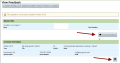
Click on any of the feedback buttons to add comments
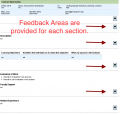
Expanded view, feedback bubbles are available at every section
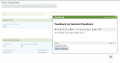
Hitting Save Feedback makes the comment immediately available to the student
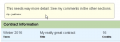
How the comments display to the student


Previous Comments and Feedback
- Previous comments are available for review by both the student and the sponsoring faculty
- Click on the Previous Comments link below the given section
Individual Study Faculty Related Articles
- Faculty Sponsor Guide
- Providing Feedback on a Contract
- Faculty: Approving a Contract
Get Help

Submit a technology support request
No account or having problems logging in?
Request help as a guest

