
Difference between revisions of "Film Edit Suites"
From Help Wiki
(→Equipment) (Tag: VisualEditor) |
|||
| (7 intermediate revisions by the same user not shown) | |||
| Line 3: | Line 3: | ||
The Film Edit Suites are located in Com 325 A,B,C and D. | The Film Edit Suites are located in Com 325 A,B,C and D. | ||
| − | + | == Access == | |
* The film edit suites require a proficiency. This is often covered in a workshop in class. | * The film edit suites require a proficiency. This is often covered in a workshop in class. | ||
* Students working independently can request a proficiency by filling out the [https://evergreen0.sharepoint.com/:l:/s/MediaServices/FBGPRlgkN6ZGu7p2SzbJyQ4BxFIcm4uxdBDfmuzl8XQFSg?nav=YTlkMTJmMzctNDNlOS00YjNiLWIwNTktY2Q0YjFlZTkzZjk3 Media Lab Proficiency Request Form] and someone will contact you. | * Students working independently can request a proficiency by filling out the [https://evergreen0.sharepoint.com/:l:/s/MediaServices/FBGPRlgkN6ZGu7p2SzbJyQ4BxFIcm4uxdBDfmuzl8XQFSg?nav=YTlkMTJmMzctNDNlOS00YjNiLWIwNTktY2Q0YjFlZTkzZjk3 Media Lab Proficiency Request Form] and someone will contact you. | ||
| − | * The students can schedule time and checkout keys from at [ | + | * The students can schedule time and checkout keys from at [https://www.evergreen.edu/offices-services/media-services/media-loan Media Loan]. |
| − | * Here are the [ | + | * Here are the [https://helpwiki.evergreen.edu/wiki/index.php/Media_Labs_Access_Policy access policies]. |
| − | + | ||
| − | + | == Equipment == | |
<gallery> | <gallery> | ||
| − | Moviscop_Diagram.jpg | + | Moviscop_Diagram.jpg |Moviscop Viewer |alt= Drawing of a Moviscop 16mm Viewer and threading diagram |
| − | Splicer-Diagram-1.jpg | + | Splicer-Diagram-1.jpg |16MM Splicer |alt= Drawing of a 16mm splicer |
| − | Splicer-Diagram-2.jpg | + | Splicer-Diagram-2.jpg |16MM Splicer |alt= Drawing of a 16mm splicer with film on the splcer. |
</gallery> | </gallery> | ||
Each suite has a variety of equipment. | Each suite has a variety of equipment. | ||
| − | + | === Editing equipment === | |
* Rewinds mounted to the table. | * Rewinds mounted to the table. | ||
* 2 spring clamps for the rewinds | * 2 spring clamps for the rewinds | ||
| Line 25: | Line 24: | ||
* 16mm viewer | * 16mm viewer | ||
* 1 split reel | * 1 split reel | ||
| − | * 1 metal take up reel | + | * 1 metal take-up reel |
| − | + | === Misc supplies === | |
* grease pencil | * grease pencil | ||
* paper tape | * paper tape | ||
| Line 41: | Line 40: | ||
325A has an Moviola flat bed editor. '''Do not use''' without training. | 325A has an Moviola flat bed editor. '''Do not use''' without training. | ||
| − | + | == Procedures == | |
* Follow Com Building access and late night access procedures | * Follow Com Building access and late night access procedures | ||
* Sign the log book and enter any problems. | * Sign the log book and enter any problems. | ||
| Line 48: | Line 47: | ||
** Clean tape off of the table and walls | ** Clean tape off of the table and walls | ||
** Pick up bits of film | ** Pick up bits of film | ||
| − | *Edit your film onto the take up reel. | + | *Edit your film onto the take-up reel. |
| − | *Rewind your edited film back onto the split reel | + | *Rewind your edited film back onto the split reel, your own daylight spool or take-up reel. |
| − | *'''Do not''' take our split reel or take up reel. | + | *'''Do not''' take our split reel or take-up reel. |
*It's okay to take a core. | *It's okay to take a core. | ||
*At the end of each quarter all film left in the room will be thrown out. | *At the end of each quarter all film left in the room will be thrown out. | ||
| − | + | == Useful Tips == | |
* Only splice one side while editing. | * Only splice one side while editing. | ||
** It's easier to take the splice apart while re-editing. | ** It's easier to take the splice apart while re-editing. | ||
Latest revision as of 11:55, 12 February 2026
Location
The Film Edit Suites are located in Com 325 A,B,C and D.
Access
- The film edit suites require a proficiency. This is often covered in a workshop in class.
- Students working independently can request a proficiency by filling out the Media Lab Proficiency Request Form and someone will contact you.
- The students can schedule time and checkout keys from at Media Loan.
- Here are the access policies.
Equipment
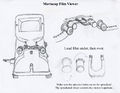
Moviscop Viewer
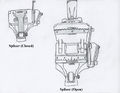
16MM Splicer
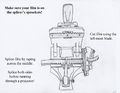
16MM Splicer


Each suite has a variety of equipment.
Editing equipment
- Rewinds mounted to the table.
- 2 spring clamps for the rewinds
- 16mm splicer
- 16mm viewer
- 1 split reel
- 1 metal take-up reel
Misc supplies
- grease pencil
- paper tape
- scissors
- hole punch
- exacto knife
- cutting mat
- extra cores
- 16mm leader
325A has an Moviola flat bed editor. Do not use without training.
Procedures
- Follow Com Building access and late night access procedures
- Sign the log book and enter any problems.
- Clean up after your self.
- Clean tape off of the splicer
- Clean tape off of the table and walls
- Pick up bits of film
- Edit your film onto the take-up reel.
- Rewind your edited film back onto the split reel, your own daylight spool or take-up reel.
- Do not take our split reel or take-up reel.
- It's okay to take a core.
- At the end of each quarter all film left in the room will be thrown out.
Useful Tips
- Only splice one side while editing.
- It's easier to take the splice apart while re-editing.
- Before running through a projector:
- make sure to double splice each edit.
- make sure each sprocket hole is clean.

