Difference between revisions of "Simple Flow Diagram-SFX Studio"
From Help Wiki
(Tag: VisualEditor) |
|||
| Line 1: | Line 1: | ||
| + | == Inputs == | ||
| + | * You can record up to 2 microhones. | ||
| + | * Use the Gain knobs to set levels. | ||
| + | * Press 48V for phantom power. | ||
| + | * Press MON to send to the Monitor Output. | ||
| + | |||
| + | === Input Monitor Mix === | ||
| + | * Adjust the mix between the direct input signals and the output of the computer playback. | ||
| + | |||
| + | == Speaker Monitor Volume == | ||
| + | * The monitor outputs are connected to stereo powered speakers. | ||
| + | ** Turn the monitor volume up when mixing. | ||
| + | ** Turn the monitor volume down when recording. | ||
| + | |||
| + | == Headphone Levels == | ||
| + | * Set the MOTU M4 headphone knob to 2:00. | ||
| + | |||
| + | === Headphpone Amp === | ||
| + | * The headphone output of the MOTU M4 is conected to a 4 channel headphone amp. | ||
| + | * Each channel has a knob for the level control. | ||
| + | |||
[[File:SFX-Studio-Signal-Flow.pdf]] | [[File:SFX-Studio-Signal-Flow.pdf]] | ||
[[Category:Sound Effects Studio]] | [[Category:Sound Effects Studio]] | ||
Revision as of 15:46, 13 March 2026
Contents
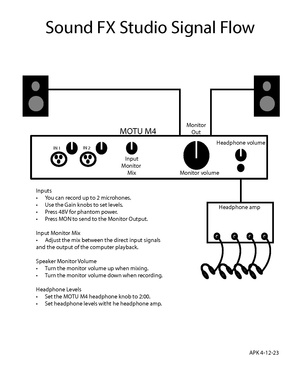
Inputs
- You can record up to 2 microhones.
- Use the Gain knobs to set levels.
- Press 48V for phantom power.
- Press MON to send to the Monitor Output.
Input Monitor Mix
- Adjust the mix between the direct input signals and the output of the computer playback.
Speaker Monitor Volume
- The monitor outputs are connected to stereo powered speakers.
- Turn the monitor volume up when mixing.
- Turn the monitor volume down when recording.
Headphone Levels
- Set the MOTU M4 headphone knob to 2:00.
Headphpone Amp
- The headphone output of the MOTU M4 is conected to a 4 channel headphone amp.
- Each channel has a knob for the level control.